Sunday, 12 December 2021

Image Picker Flutter - Pick Image From Gallery or Camera

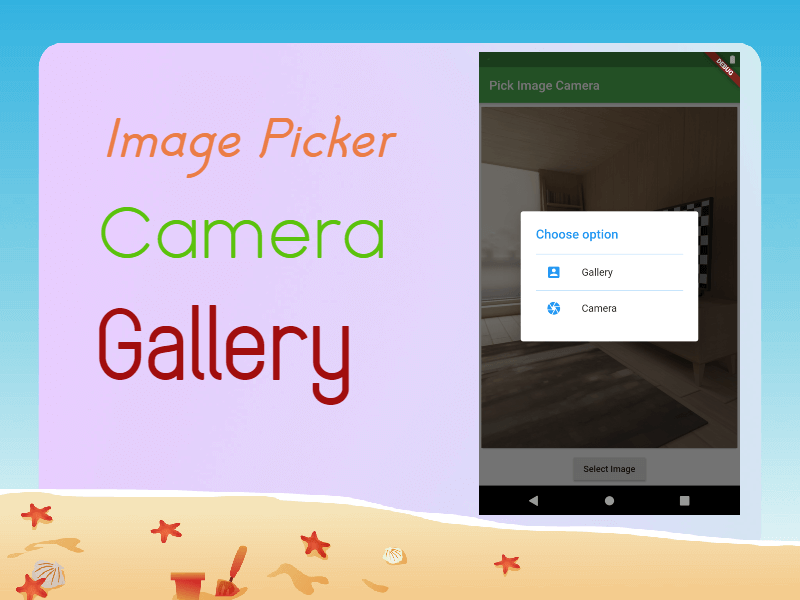
Flutter application that is accessing the camera to take a picture or using the gallery to pick an image then in this tutorial we are going to learn how to access Camera or Gallery in a flutter application. In this Image Picker Example, we are going to use ImagePicker dependency to access the camera/gallery. You can read also How to Capture Video from camera in flutter
dev_dependencies:
  image_picker: ^0.8.3+3
  
How to capture Image from Camera? To capture an image from the camera first we need to create ImagePicker instance This ImagePicker contains method getImage() will return Image File. To get from Camera we need to pass the ImageSource.camera parameter to this getImage().
void _openCamera(BuildContext context)  async{
    final pickedFile = await ImagePicker().getImage(
          source: ImageSource.camera ,
          );
          setState(() {
          imageFile = pickedFile!;
    });
    Navigator.pop(context);
}
we don't know how much time will it take to capture the image from the camera, so we are written this method inside the future method. similarly to pick an image from the gallery we need to pass ImageSource.gallery as a parameter.
void _openGallery(BuildContext context) async{
  final pickedFile = await ImagePicker().getImage(
    source: ImageSource.gallery ,
  );
  setState(() {
    imageFile = pickedFile!;
  });

  Navigator.pop(context);
}
Show Dialog In a flutter With the showDialog() widget we are showing the dialog by returns AlertDialog widget
 Future_showChoiceDialog(BuildContext context)
{
  return showDialog(context: context,builder: (BuildContext context){

    return AlertDialog(
      title: Text("Choose option",style: TextStyle(color: Colors.blue),),
      content: SingleChildScrollView(
      child: ListBody(
        children: [
          Divider(height: 1,color: Colors.blue,),
          ListTile(
            onTap: (){
              _openGallery(context);
            },
          title: Text("Gallery"),
            leading: Icon(Icons.account_box,color: Colors.blue,),
      ),

          Divider(height: 1,color: Colors.blue,),
          ListTile(
            onTap: (){
              _openCamera(context);
            },
            title: Text("Camera"),
            leading: Icon(Icons.camera,color: Colors.blue,),
          ),
        ],
      ),
    ),);
  });
}
   
Download complete source code for Flutter Image Picker example

Flutter API Integration

Python Library Management System Project

C++ Library Management System Project

Friday, 7 August 2020

Finance Budget 2020 - Income Tax Slabs

 On 1st February 2020, Finance Minister Nirmala Sitaraman introduced new budget slab, which is likely to benefit all those who earn up to 15,00,000/- INR. 


Income Tax Slab 2020:


Nil    :  0 to 2,50,000/-

05% :  2,50,000/- to 5,00,000/-

10% :  5,00,000/- to 7,50,000/-

15% :  7,50,000/- to 10,00,000/-

20% :  10,00,000/- to 12,50,000/-

25% :  12,50,000/- to 15,00,000/-

30% :  15,00,000/- & above

5 Apps To Increase Your Productivity


1. IFTT- :
It is one of the more interesting productivity apps available on Android. The app allows you to make methods that tell various apps to do several things at multiple times. It mostly takes almost any assignment and makes your phone do it autonomously.

Additionally, you can do smart things like auto-save your Instagram photos to Dropbox. It's sturdy, but there is a knowledge curve. You can find a diversity of pre-made recipes with a few easy Google Searches. Tasker is another great app for this sort of stuff, but IFTTT is a little easier to use.

2. PushBullet-:
Pushbullet is one of the standard productivity apps. It helps connect the gap between your mobile and your computer. You can do things like replying to text messages, send files, and even set up channels to get announcements about specific things.

It should work on Linux, Windows, and even Mac. That makes it the best solution for just about anybody. The free version gives you a taste of the features. That way, you can experiment them out. You'll have to upgrade to pro to get endless amounts of everything. AirDroid and AirMirror are great other options to Pushbullet.

3. Slack-:
Slack is simply the most competent business chat app currently available. It supports text and voice chats. There is also an alliance for Google Drive, Asana, and other productivity apps. You also get aid for Giphy.

You can make a virtually endless number of channels. That way, teams can split off and talk about their projects individually. It's that important.

Additionally, shorter groups can demo the app for free for as long as needed. Pricing plans modify and are easily viewable on Slack's official site.

4. Trello:
Trello bills itself as a virtual sidekick. The purpose is to help you stay organized at work and home. It does this by being a pretty darn, good task manager. You can create Boards to help keep your various projects organized, and each board permits you to operate on one task at a time.

The app allows for collaboration with colleagues and friends, which makes it excellent for a work or family environment. It also comes with Android Wear Support, Dropbox, and Google Drive. It's entirely free to use forever. That makes it one of the most notable productivity apps on a budget.

5. Forest:
Forest is an unusual kind of productivity app. Sometimes you need to get off of your phone and focus more on work. Apps like Forest can help. It gives you a purpose not to use your phone. The app grows a tree that expires if you use your phone. You can collect various trees as you proceed through the game.

Google implemented the same idea with its Digital Wellbeing app, and YouTube has a timer as well. We also really like 5217, an app that times you for 52 minutes followed by a 17-minute break.

It's an interesting genre of apps that can help enhance your productivity if you find the right one

Monday, 26 February 2018

Download files in background service


Service class
class DownloadService extends IntentService {
RetrofitConnection retrofitInterface;
public DownloadService() {
super("Download Service");
}
private NotificationCompat.Builder notificationBuilder;
private NotificationManager notificationManager;
private int totalFileSize;
private String image_url;
int type;
String filename;
@Override protected void onHandleIntent(Intent intent) {
if (intent.getExtras() != null && intent != null) {
image_url = intent.getStringExtra("img");
type = intent.getIntExtra("type", 0);
filename = intent.getStringExtra("filename");
Log.e("TYPE", "" + type);
}
notificationManager = (NotificationManager)
getSystemService(Context.NOTIFICATION_SERVICE);
notificationBuilder = new NotificationCompat.Builder(this)
.setSmallIcon(R.mipmap.downd)
.setContentTitle("Download")
.setContentText("Downloading image")
.setAutoCancel(true);
notificationBuilder.getNotification().flags |= Notification.FLAG_AUTO_CANCEL;
notificationManager.notify(0, notificationBuilder.build());
if (NetworkChecking.isConnected(getApplicationContext())) {
initDownload(image_url);
} else {
Utils.toastMessage(getApplicationContext(),
Utils.network_message);
}
}
private void initDownload(String url) {
downloadFile(request.execute().body());
} catch (IOException e) {
e.printStackTrace();
Toast.makeText(getApplicationContext(), e.getMessage(),
Toast.LENGTH_SHORT).show();
}
}
private void downloadFile(ResponseBody body) throws IOException {
int count;
byte data[] = new byte[1024 * 4];
long fileSize = body.contentLength();
InputStream bis = new BufferedInputStream(body.byteStream(),
1024 * 8);
Log.e("outputFile", "" + outputFile);
OutputStream output = new FileOutputStream(outputFile);
long total = 0;
long startTime = System.currentTimeMillis();
int timeCount = 1;
while ((count = bis.read(data)) != -1) {
total += count;
totalFileSize = (int) (fileSize / (Math.pow(1024, 2)));
double current = Math.round(total / (Math.pow(1024, 2)));
int progress = (int) ((total * 100) / fileSize);
long currentTime = System.currentTimeMillis() - startTime;
Download download = new Download();
download.setTotalFileSize(totalFileSize);
if (currentTime > 1000 * timeCount) {
download.setCurrentFileSize((int) current);
download.setProgress(progress);
sendNotification(download,outputFile.getPath());
timeCount++; }
output.write(data, 0, count);
}
onDownloadComplete(outputFile.getPath());
output.flush(); output.close();
private void sendNotification(Download download,String filePath) {
bis.close(); }
File file = new File(filePath);
MimeTypeMap map = MimeTypeMap.getSingleton();
String ext = MimeTypeMap.getFileExtensionFromUrl(
file.getName());
String type = map.getMimeTypeFromExtension(ext);
if (type == null)
type = "*/*";
Intent intent = new Intent(Intent.ACTION_VIEW);
Uri data = Uri.fromFile(file);
intent.setDataAndType(data, type);
sendIntent(download);
notificationBuilder.setProgress(100, download.getProgress(),
false);
notificationBuilder.setContentText("Downloading file " +
download.getCurrentFileSize() + "/" + totalFileSize + " MB");
notificationBuilder.setContentIntent
(PendingIntent.getActivity(getApplicationContext(), 0, intent,
PendingIntent.FLAG_CANCEL_CURRENT));
notificationManager.notify(0, notificationBuilder.build());
}
private void sendIntent(Download download) {
Intent intent = new Intent(ShowImageActivity.MESSAGE_PROGRESS);
intent.putExtra("download", download);
LocalBroadcastManager.getInstance(DownloadService.this).
sendBroadcast(intent);
}
private void onDownloadComplete(String filePath) {
Download download = new Download();
download.setProgress(100);
sendIntent(download);
File file = new File(filePath);
MimeTypeMap map = MimeTypeMap.getSingleton();
String ext = MimeTypeMap.getFileExtensionFromUrl
(file.getName());
String type = map.getMimeTypeFromExtension(ext);
if (type == null)
type = "*/*";
Intent intent = new Intent(Intent.ACTION_VIEW);
Uri data = Uri.fromFile(file);
intent.setDataAndType(data, type);
notificationManager.cancel(0);
notificationBuilder.setProgress(0, 0, false);
notificationBuilder.setContentText("File Downloaded");
notificationBuilder.setContentIntent
(PendingIntent.getActivity(getApplicationContext(), 0, intent,
PendingIntent.FLAG_CANCEL_CURRENT));
notificationManager.notify(0, notificationBuilder.build());
}
@Override public void onTaskRemoved(Intent rootIntent) {
notificationManager.cancel(0);
}
public File getOutputMediaFile(int type) {
String folder_name = "TYC";
File mediaStorageDir = new File(Environment.
getExternalStorageDirectory() + "/" + folder_name, "IMAGES");
if (!mediaStorageDir.exists()) {
mediaStorageDir.mkdirs();
}
File f1 = new File(Environment.getExternalStorageDirectory()
+ "/" + folder_name, "DOCUMENTS");
if (!f1.exists()) {
f1.mkdirs();
}
Locale.getDefault()).format(new Date());
File mediaFile;
mediaFile = new File(mediaStorageDir.getPath() +
File.separator + "img_" + timeStamp + ".jpg");
} else if (type == 2) {
mediaFile = new File(f1.getPath() + File.separator
+ "PDF_" + timeStamp + ".pdf");
} else if (type == 3) {
mediaFile = new File(f1.getPath() + File.separator
+ filename);
}else {
return null;
}
return mediaFile;
} }
Call service from Button click
Intent intent = new Intent(getActivity(), DownloadService.class);
intent.putExtra("img", "pass your file path");
intent.putExtra("type", 3);
intent.putExtra("filename", "Pass here your file name");
startService(intent);

Saturday, 26 August 2017

Images/Icon sizes for different devices

Developer will think about what size of icons/images have to use for application that will support for different devices.

Please follow below ratio for images/icons

Role / Screen |  LDPI  |  MDPI  |  HDPI  |  XHDPI  |
----------------------------------------------------
Icon          |  36x36 |  48x48 |  72x72 |  96x96  |
----------------------------------------------------
Thumbnail     |  72x72 |  96x96 | 144x144| 192x192 |
----------------------------------------------------
Full          | 240x320|320x480 | 480x800| 720x1280| 

Wednesday, 21 December 2016

Retrofit in Android


Retrofit is a type-safe REST client for Android developed by Square. The library provides a powerful framework for authenticating and interacting with APIs and sending network requests with OkHttp

Integrate Retrofit in Android follow Below steps:

1) Add dependencies in build.gradle file


compile 'com.squareup.retrofit2:retrofit:2.0.2'
compile 'com.squareup.retrofit2:converter-gson:2.0.2'
compile 'com.squareup.retrofit2:converter-scalars:2.1.0'

2) Create Interface which will have all the api calls


public interface DataCall{


    //Get Method Call
    @GET("Pass your api path) //ex: "register.php"
    Call<String>getDataGet(@Query("name") String name);


   //Post Method Call
@FormUrlEncoded @POST("index.php") Call<String>getDataPost(@Field("name")String name);
   //Post Method Call with Query annotation
@POST("index.php") Call<String>getDataPostQuery(@Query("name")String name); //Post Method Call with HashMap request
    @POST("index.php")
    Call<String>getDataPostQueryMap(@QueryMap HashMap<String,String> map);

   //Post Method Call with Json request
    @POST("index.php")
    Call<String>getDataPostQueryJson(@Body RequestBody name);

   
}

3) Create Retrofit object and call api methods.

Retrofit retrofit = new Retrofit.Builder().baseUrl("pass here your base url, 
shoul end with /")
        .addConverterFactory(ScalarsConverterFactory.create()).build();
//ScalarsConverterFactory.create() is for String response handling
//GsonConverterFactory.create() is used for automatically will parse the 
//response with proper bean classes


DataCall datacall = retrofit.create(DataCall.class);


//Get Method call
 Call<String> call = datacall.getDataGet("GET name");
     call.enqueue(new Callback<String>() {
         @Override         public void onResponse(Call<String> call,
 Response<String> response) {
             System.out.println("Response data :"+response.body());
         }

         @Override         public void onFailure(Call<String> call, Throwable t) {
             System.out.println("Response data :"+t.getMessage());
         }
     });

//Post Method call
call = datacall.getDataPost("POST name"); call.enqueue(new Callback<String>() { @Override public void onResponse(Call<String> call,
Response<String> response) {
             System.out.println("Response data :"+response.body());
         }

         @Override         public void onFailure(Call<String> call, Throwable t) {
             System.out.println("Response data :"+t.getMessage());
         }
     });


//Post Method call
call = datacall.getDataPostQuery("POST Query"); call.enqueue(new Callback<String>() { @Override public void onResponse(Call<String> call,
Response<String> response) {
             System.out.println("Response data :"+response.body());
         }

         @Override         public void onFailure(Call<String> call, Throwable t) {
             System.out.println("Response data :"+t.getMessage());
         }
     });


//Post Method call with Hash map request
HashMap<String,String>map=new HashMap(); JSONObject ob2=null; // JSONObject map=new JSONObject(); try { map.put("name1", "Map name"); map.put("password1", "Map password"); ob2=new JSONObject(map); }catch (Exception e) { e.printStackTrace();; } RequestBody body = RequestBody.
create(okhttp3.MediaType.parse("application/json; charset=utf-8"),ob2.toString());

        call = datacall.getDataPostQueryJson(body);
     call.enqueue(new Callback<String>() {
         @Override         public void onResponse(Call<String> call, 
Response<String> response) {
             System.out.println("Response data :"+response.body());
         }

         @Override         public void onFailure(Call<String> call, Throwable t) {
             System.out.println("Response data :"+t.getMessage());
         }
     });

//Post Method call with JSon Request

  JSONObject map=new JSONObject();
     try {
         map.put("name1", "Map name");
         map.put("password1", "Map password");

          
     }catch (Exception e)
     {
         e.printStackTrace();;
     }
     RequestBody body = RequestBody.
create(okhttp3.MediaType.parse("application/json; charset=utf-8"),map.toString());

        call = datacall.getDataPostQueryJson(body);
     call.enqueue(new Callback<String>() {
         @Override         public void onResponse(Call<String> call, 
Response<String> response) {
             System.out.println("Response data :"+response.body());
         }

         @Override         public void onFailure(Call<String> call, Throwable t) {
             System.out.println("Response data :"+t.getMessage());
         }
     });

Wednesday, 2 November 2016

Android Notifications


Notification creation in android has updated with few methods are deprecated in Marsh Mallows Version

I have created notification in differert formats
check below Fragment class and xml files

/**
 * A fragment that enables display of notifications.
 */
public class ActiveNotificationFragment extends Fragment {

    private static final String TAG = "ActiveNotificationFragment";

    private NotificationManager mNotificationManager;
    private TextView mNumberOfNotifications;

    // Every notification needs a unique ID otherwise the previous one would be overwritten.
    private int mNotificationId = 0;
    private PendingIntent mDeletePendingIntent;

    @Override
    public View onCreateView(LayoutInflater inflater, ViewGroup container,
            Bundle savedInstanceState) {
        return inflater.inflate(R.layout.fragment_notification_builder, container, false);
    }

    @Override
    public void onResume() {
        super.onResume();
        updateNumberOfNotifications();
    }

    @Override
    public void onViewCreated(View view, Bundle savedInstanceState) {
        super.onViewCreated(view, savedInstanceState);
        mNotificationManager = (NotificationManager) getActivity().getSystemService(
                Context.NOTIFICATION_SERVICE);
        mNumberOfNotifications = (TextView) view.findViewById(R.id.number_of_notifications);

        // Supply actions to the button that is displayed on screen.
        View.OnClickListener onClickListener = new View.OnClickListener() {
            @Override
            public void onClick(View v) {
                switch (v.getId()) {
                    case R.id.add_notification:
                        addNotificationAndReadNumber();
                        break;
                        case R.id.add_notification_big:
                            addBigText();
                            break;
                    case R.id.add_notification_big_image:
                        addBigImage();
                        break;
                    case R.id.add_notification_heads:
                        addHeadsUpNotification();
                        break;
                    case R.id.add_notification_action:
                        customNotification();
                        break;

                }
            }
        };
        view.findViewById(R.id.add_notification).setOnClickListener(onClickListener);

        view.findViewById(R.id.add_notification_big).setOnClickListener(onClickListener);

        view.findViewById(R.id.add_notification_big_image).setOnClickListener(onClickListener);

        view.findViewById(R.id.add_notification_heads).setOnClickListener(onClickListener);

        view.findViewById(R.id.add_notification_action).setOnClickListener(onClickListener);
       
        // Create a PendingIntent to be fired upon deletion of a Notification.
        Intent deleteIntent = new Intent("YOUR ACTIVITY/BORADCASTRECEIVER";
        mDeletePendingIntent = PendingIntent.getBroadcast(getActivity(),
                2 /* requestCode */, deleteIntent, 0);
       
    }

    /**
     * Add a new {@link Notification} with sample data and send it to the system.
     * Then read the current number of displayed notifications for this application.
     */
    private void addNotificationAndReadNumber() {
        // [BEGIN create_notification]
        // Create a Notification and notify the system.
        final Notification.Builder builder = new Notification.Builder(getActivity())
                .setSmallIcon(R.mipmap.ic_notification)
                .setContentTitle(getString(R.string.app_name))
                .setContentText(getString(R.string.sample_notification_content))
                .setAutoCancel(true)
                .setDeleteIntent(mDeletePendingIntent);


builder.setContentIntent(getPendingIntent());

        final Notification notification = builder.build();
        mNotificationManager.notify(++mNotificationId, notification);
        // [END create_notification]
        Log.i(TAG, "Add a notification");
        updateNumberOfNotifications();

    }

    private void addBigText()
    {
        NotificationCompat.Builder mBuilder = new NotificationCompat.Builder(getActivity())
                .setSmallIcon(R.mipmap.ic_notification)
                .setContentTitle("Event tracker")
                .setContentText("Events received")/*.
                        setVisibility(NotificationCompat.VISIBILITY_SECRET)
                .setPriority(NotificationCompat.PRIORITY_MAX)
                .setVibrate(new long[] {1, 1, 1})*/;


      /*  Intent push = new Intent();
        push.addFlags(Intent.FLAG_ACTIVITY_NEW_TASK);
        push.setClass(getActivity(), MainActivity.class);

        PendingIntent fullScreenPendingIntent = PendingIntent.getActivity(getActivity(), 0,
                push, PendingIntent.FLAG_CANCEL_CURRENT);
        mBuilder
                .setContentText("A Heads-Up notification for Lollipop and above")
                .setFullScreenIntent(fullScreenPendingIntent, true);
*/
       // notificationManager.notify(HEADS_UP_NOTIFICATION_ID, notificationBuilder.build());
        mBuilder .setAutoCancel(true);
        NotificationCompat.InboxStyle inboxStyle =
                new NotificationCompat.InboxStyle();
        String[] events = new String[6];
// Sets a title for the Inbox in expanded layout
        inboxStyle.setBigContentTitle("Event tracker details:");

// Moves events into the expanded layout
        for (int i=0; i < events.length; i++) {

            inboxStyle.addLine(events[i]+" : "+i);
        }
// Moves the expanded layout object into the notification object.
        mBuilder.setStyle(inboxStyle);
        mBuilder.setContentIntent(getPendingIntent());
        Notification notification=mBuilder.build();
      //  mBuilder.setAutoCancel(true);
        mNotificationManager.notify(++mNotificationId, notification);
        updateNumberOfNotifications();
    }
private void addBigImage()
{

    NotificationCompat.Builder mBuilder = new NotificationCompat.Builder(getActivity())
            .setSmallIcon(R.mipmap.ic_notification)
            .setContentTitle("Event tracker")
            .setContentText("Events received")
                      ;
    NotificationCompat.BigPictureStyle inboxStyle =
            new NotificationCompat.BigPictureStyle();
    String[] events = new String[6];

    inboxStyle.setBigContentTitle("Event tracker details:");
    inboxStyle.bigPicture(BitmapFactory.decodeResource(getResources(),R.mipmap.ic_launcher));
// Moves events into the expanded layout
    mBuilder.setAutoCancel(true);
// Moves the expanded layout object into the notification object.
    mBuilder.setStyle(inboxStyle);
    mBuilder.setContentIntent(getPendingIntent());
    Notification notification=mBuilder.build();

    mNotificationManager.notify(++mNotificationId, notification);
    updateNumberOfNotifications();
}
    private void addHeadsUpNotification()
    {
        Notification.Builder builder=new Notification.Builder(getActivity());
        builder.setSmallIcon(R.mipmap.ic_launcher);
        builder.setPriority(Notification.PRIORITY_HIGH);
        builder.setVibrate(new long[]{100,200,100});
        builder.setContentTitle("HeadsUpNotification");
        builder.setContentIntent(getPendingIntent());
        builder.setAutoCancel(true);
        mNotificationManager.notify(++mNotificationId,builder.build());
    }


    /**
     * Request the current number of notifications from the {@link NotificationManager} and
     * display them to the user.
     */
    protected void updateNumberOfNotifications() {
        // [BEGIN get_active_notifications]
        // Query the currently displayed notifications.
if(Build.VERSION.SDK_INT<Build.VERSION_CODES.M)
    return;
        final StatusBarNotification[] activeNotifications = mNotificationManager
                .getActiveNotifications();
        // [END get_active_notifications]
        final int numberOfNotifications = activeNotifications.length;
        mNumberOfNotifications.setText(getString(R.string.active_notifications,
                numberOfNotifications));
        Log.i(TAG, getString(R.string.active_notifications, numberOfNotifications));
    }
    private PendingIntent getPendingIntent()
    {

        Intent intent=new Intent(getActivity(),SeconActivity.class);
        PendingIntent pending=PendingIntent.getActivity(getActivity(),0,intent,PendingIntent.FLAG_CANCEL_CURRENT);
        return pending;
    }
    private void customNotification()
    {
        RemoteViews remoteview=new RemoteViews(getActivity().getPackageName(),R.layout.remoteview);
        NotificationCompat.Builder notificationBuilder = new NotificationCompat.Builder(getActivity())
                .setContent(remoteview).setSmallIcon(R.mipmap.ic_launcher);
        notificationBuilder.setAutoCancel(true);
Notification notification=notificationBuilder.build();
        remoteview.setOnClickPendingIntent(R.id.img,PendingIntent.getActivity(getActivity(),0,new Intent(getActivity(),SeconActivity.class),PendingIntent.FLAG_CANCEL_CURRENT));
        notification.bigContentView = remoteview;
        notification.flags|=Notification.FLAG_AUTO_CANCEL;
        mNotificationManager.notify(++mNotificationId,notification);
    }
}

XML File
------------

<?xml version="1.0" encoding="utf-8"?>

<LinearLayout xmlns:android="http://schemas.android.com/apk/res/android"
    android:orientation="vertical"
    android:layout_width="match_parent"
    android:layout_height="match_parent">
    <LinearLayout
        android:layout_width="match_parent"
        android:layout_height="wrap_content"
        android:orientation="vertical">
    <Button
        android:id="@+id/add_notification"
        android:text="@string/add_a_notification"
        android:layout_width="wrap_content"
        android:layout_height="wrap_content" />

        <Button
            android:id="@+id/add_notification_big"
            android:text="BigText Notification"
            android:layout_width="wrap_content"
            android:layout_height="wrap_content" />

        <Button
            android:id="@+id/add_notification_big_image"
            android:text="BigImage Notification"
            android:layout_width="wrap_content"
            android:layout_height="wrap_content" />

        <Button
            android:id="@+id/add_notification_heads"
            android:text="HeadsUp notification"
            android:layout_width="wrap_content"
            android:layout_height="wrap_content" />

        <Button
            android:id="@+id/add_notification_action"
            android:text="Action notification"
            android:layout_width="wrap_content"
            android:layout_height="wrap_content" />


    </LinearLayout>

    <TextView
        style="@android:style/TextAppearance.Material.Large"
        android:id="@+id/number_of_notifications"
        android:layout_width="wrap_content"
        android:layout_height="wrap_content" />
</LinearLayout>


remoteview layout
-----------------------

<?xml version="1.0" encoding="utf-8"?>
<RelativeLayout xmlns:android="http://schemas.android.com/apk/res/android"
    android:orientation="vertical" android:layout_width="match_parent"
    android:layout_height="wrap_content">
    <LinearLayout
        android:layout_width="match_parent"
        android:layout_height="wrap_content"
        android:layout_toLeftOf="@+id/img"
        android:orientation="vertical">
        <TextView
            android:layout_width="match_parent"
            android:layout_height="wrap_content"
            android:textColor="#d94cd9"
            android:text="Title"/>
        <TextView
            android:layout_width="match_parent"
            android:layout_height="wrap_content"
            android:textColor="#e10a23"
            android:text="Description"/>
        <TextView
            android:layout_width="match_parent"
            android:layout_height="wrap_content"
            android:textColor="#c4612c"
            android:text="Title"/>
        <TextView
            android:layout_width="match_parent"
            android:layout_height="wrap_content"
            android:textColor="#a7ab42"
            android:text="Description"/>
        <TextView
            android:layout_width="match_parent"
            android:layout_height="wrap_content"
            android:textColor="#701770"
            android:text="Title"/>
        <TextView
            android:layout_width="match_parent"
            android:layout_height="wrap_content"
            android:textColor="#5a51bc"
            android:text="Description"/>

    </LinearLayout>
    <ImageView android:id="@+id/img"
        android:layout_width="wrap_content"
        android:layout_height="wrap_content"
        android:src="@mipmap/ic_launcher"
        android:layout_alignParentRight="true"/>

</RelativeLayout>